'%20stroke-width='9'%20/%3e%3cpolyline%20points='52,38%2032,60%2052,82'%20fill='none'%20stroke='url(%23g1)'%20stroke-width='9'%20stroke-linecap='round'%20stroke-linejoin='round'%20/%3e%3cpolyline%20points='68,38%2088,60%2068,82'%20fill='none'%20stroke='url(%23g1)'%20stroke-width='9'%20stroke-linecap='round'%20stroke-linejoin='round'%20/%3e%3ccircle%20cx='60'%20cy='60'%20r='7'%20fill='url(%23g1)'/%3e%3c/svg%3e)
AI-driven parametric 3D model generator

I spent a month and a fair amount of lost sleep building a parametric 3D model generator, where an AI agent gets a prompt like “simple bookshelf” and spits out a ready STEP, GLB and FCStd file. It works. And I still haven’t generated anything I couldn’t do by hand in FreeCAD GUI in five minutes.
This is an honest write-up of a project running under the codename bluecad. I don’t have a final name yet. I’m also not publishing the source for now, because I’m not sure which direction I want to take it.
What it was supposed to do
The idea was simple. You type “bookshelf with five shelves, 180cm tall, 30cm deep” in chat, the agent understands the geometry, plans features the way an engineer would in PartDesign (body → sketch → pad → pocket → fillet), and the backend produces a parametric FCStd file plus STEP, STL, GLB, OBJ and 3MF exports.
The stack is fairly conventional:
- Monorepo on Turbo + pnpm
- API in NestJS, BullMQ, Drizzle, Supabase auth
- Worker in NestJS, consuming the job queue
- FreeCAD running as a separate Python service (FastAPI), because FreeCAD has no usable API in any language other than its own Python
- Web in Nuxt 4 and Pinia
- Postgres, Redis, Supabase Storage for files
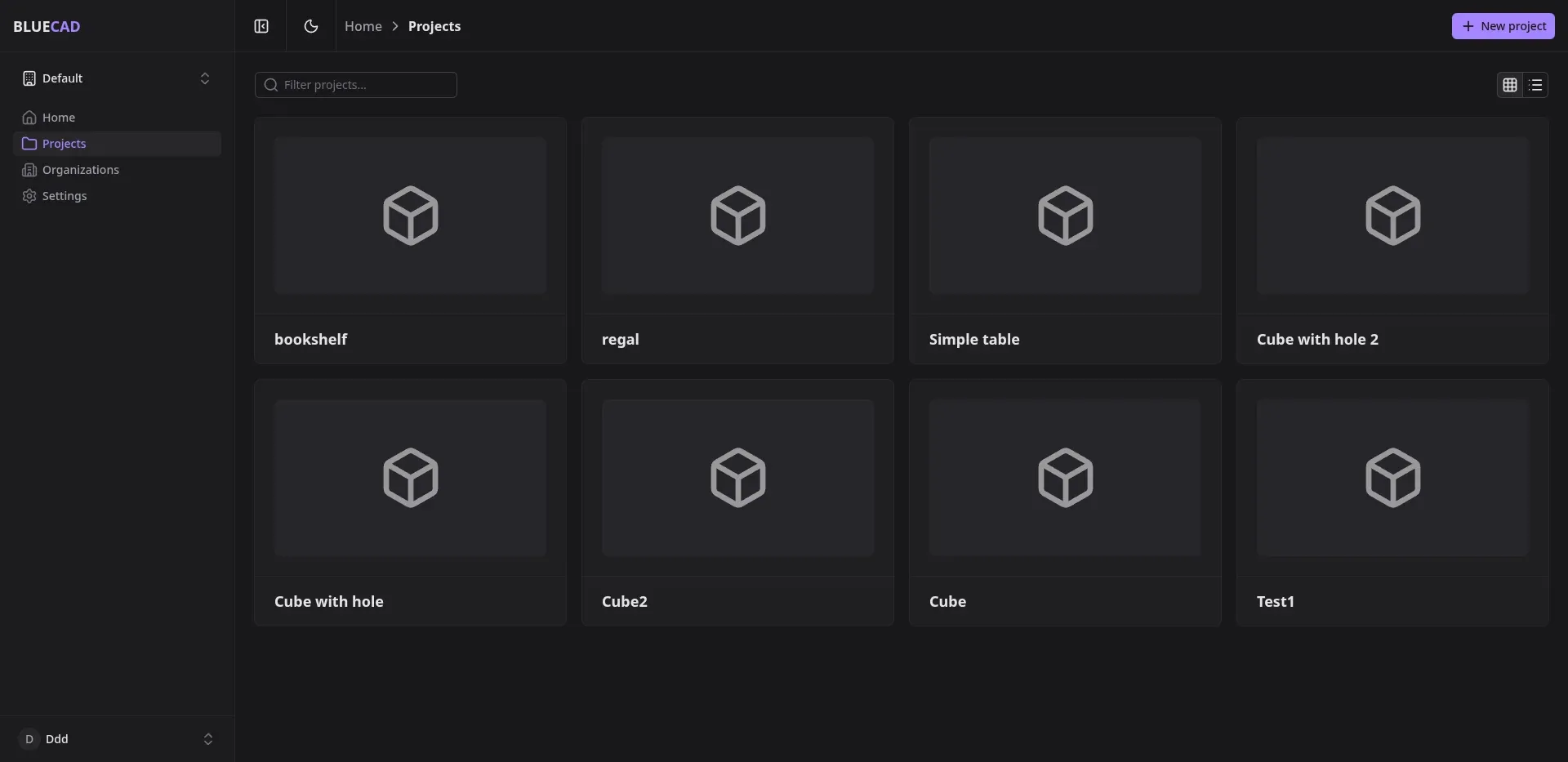
The frontend (Nuxt 4) has a job queue view, organizations, projects, and a separate 3D viewer for the generated GLBs.
Why FreeCAD
I wanted real BREPs, not meshes. The goal was that at the end of the pipeline an engineer could open the generated file in stock FreeCAD, see the PartDesign tree, change a pad length, move a sketch, add a feature, recompute. A mesh wouldn’t give me that. STL out of a generative tool is a dead end.
That narrowed the list fast. FreeCAD is open source, runs headless, has parametric bodies and the classic PartDesign workflow that anyone who has touched a commercial CAD knows. Alternatives ruled themselves out quickly: OpenCascade directly is too low-level and produces no editable tree, Blender is great with meshes and poor at BREPs, and commercial options like OnShape or Fusion come with closed APIs and license costs.
The choice was easy. Later I deeply regretted it.
JSONCAD, the layer the agent has to understand
The agent doesn’t generate Python. It generates an intermediate layer I called JSONCAD. It’s a declarative description of operations that I can validate, replay, version, and most importantly: hand to an LLM in a simple shape.
Example: “cube with a hole”:
{ "operations": [ { "type": "body", "id": "body1" }, { "type": "sketch", "id": "sketch1", "parent": "body1", "plane": { "position": [0, 0, 0], "rotation": [0, 0, 0] }, "entities": [{ "kind": "circle", "center": [0, 0], "radius": 5 }] }, { "type": "pad", "id": "pad_0", "parent": "body1", "profile": "sketch1", "extent": "distance", "length": 20 } ]}Every operation has its own zod schema and a mapping to FreeCAD’s newObject. The worker takes JSONCAD, calls the Python service, which runs the right handlers and a recompute() on the document. All the agent has to keep in its head is a dictionary of a dozen-something operation types.
Why I didn’t give the agent JSON directly
The first version forced the agent to return JSON. Hit rate was mediocre. LLMs hallucinate fields, confuse id with name, drop the odd bracket, sometimes start wrapping JSON in markdown. The validator was throwing out 30-40% of responses.
I switched to a TypeScript-flavored DSL. The agent emits something like:
cad.body('body1')
cad.sketchPlane('sketch1', 0, 0, 0, 0, 0, 0)cad.line(0, 0, 100, 0)cad.line(100, 0, 100, 100)cad.line(100, 100, 0, 100)cad.line(0, 100, 0, 0)cad.padDistance(10)
cad.sketchPlane('sketch2', 0, 0, 10, 0, 0, 0)cad.circle(50, 50, 10)cad.pocketDistance(10)
cad.filletAll(2)Under the hood it’s still JSONCAD, just built by a fluent builder. The system prompt says it plainly: the first line must start with cad., no const, no let, no loops, no conditionals, one line per method call. DSL validation is brutally simple:
export function validateDsl(code: string): boolean { for (const raw of code.split('\n')) { const line = raw.trim(); if (!line) continue; if (!line.startsWith('cad.')) return false; if (!line.endsWith(')') && !line.endsWith(');')) return false; if (/[{}=]/.test(line)) return false; // method name has to be on the allowed list } return true;}After this change the generation success rate jumped past 90%. Same prompt, same Claude on the backend, only the shape of the response changed. Constraining the agent worked better than teaching it the format.
The FreeCAD API is pain
I expected this to take a few afternoons. It took weeks.
FreeCAD has multiple API layers that don’t fully agree with each other. There’s Part (low-level geometry), PartDesign (parametric features), Sketcher (2D sketches), Draft. Each set of docs points you in a different direction. What works in Part doesn’t necessarily survive being placed inside a PartDesign::Body. Some operations require recompute() at a very specific moment, others corrupt the document if you recompute() too early.
A classic: fillet. In the GUI you click edges. In the API you supply a list of names like Edge12, Edge17. Those names shift on every model change, because FreeCAD has no stable TNP (Topological Naming Problem is a well-known, open issue and has been for years). I ended up writing edge selection by geometry instead of by ID:
for i, edge in enumerate(shape.Edges): v1, v2 = edge.Vertexes[0].Point, edge.Vertexes[1].Point dx, dy, dz = v2.x - v1.x, v2.y - v1.y, v2.z - v1.z
if kind == "vertical": if abs(dx) < tol and abs(dy) < tol and abs(dz) > tol: edges_to_use.append(f"Edge{i+1}") elif kind == "axis" and selector.axis == "z": if abs(dx) < tol and abs(dy) < tol: edges_to_use.append(f"Edge{i+1}") # ...Instead of “take edge number X”, the agent says “take all vertical edges” or “all outer edges”. It works with concepts, not identifiers. One of the few pieces of this project I’m actually happy with.
What I managed to generate
This is where things get less flattering.
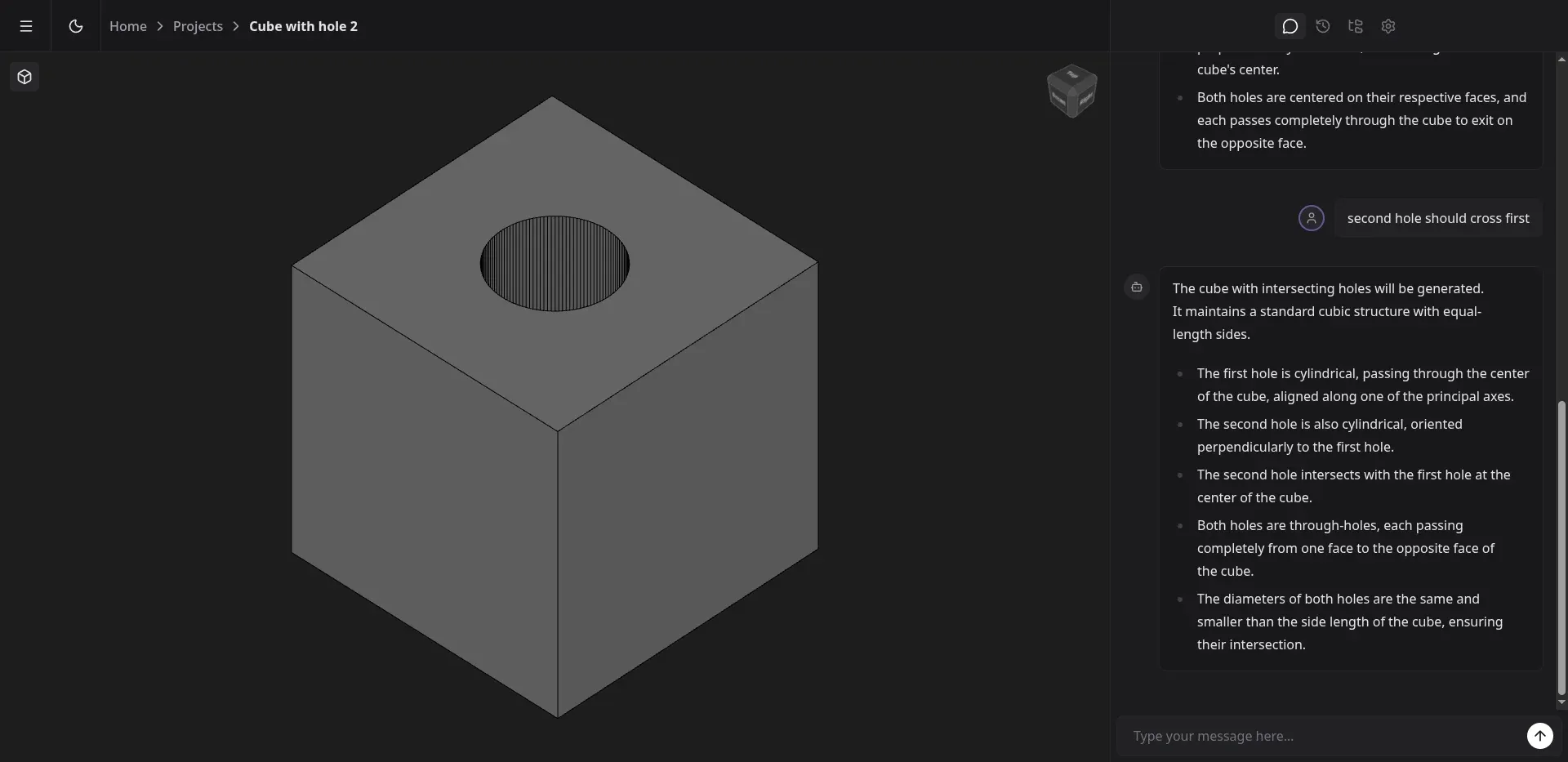
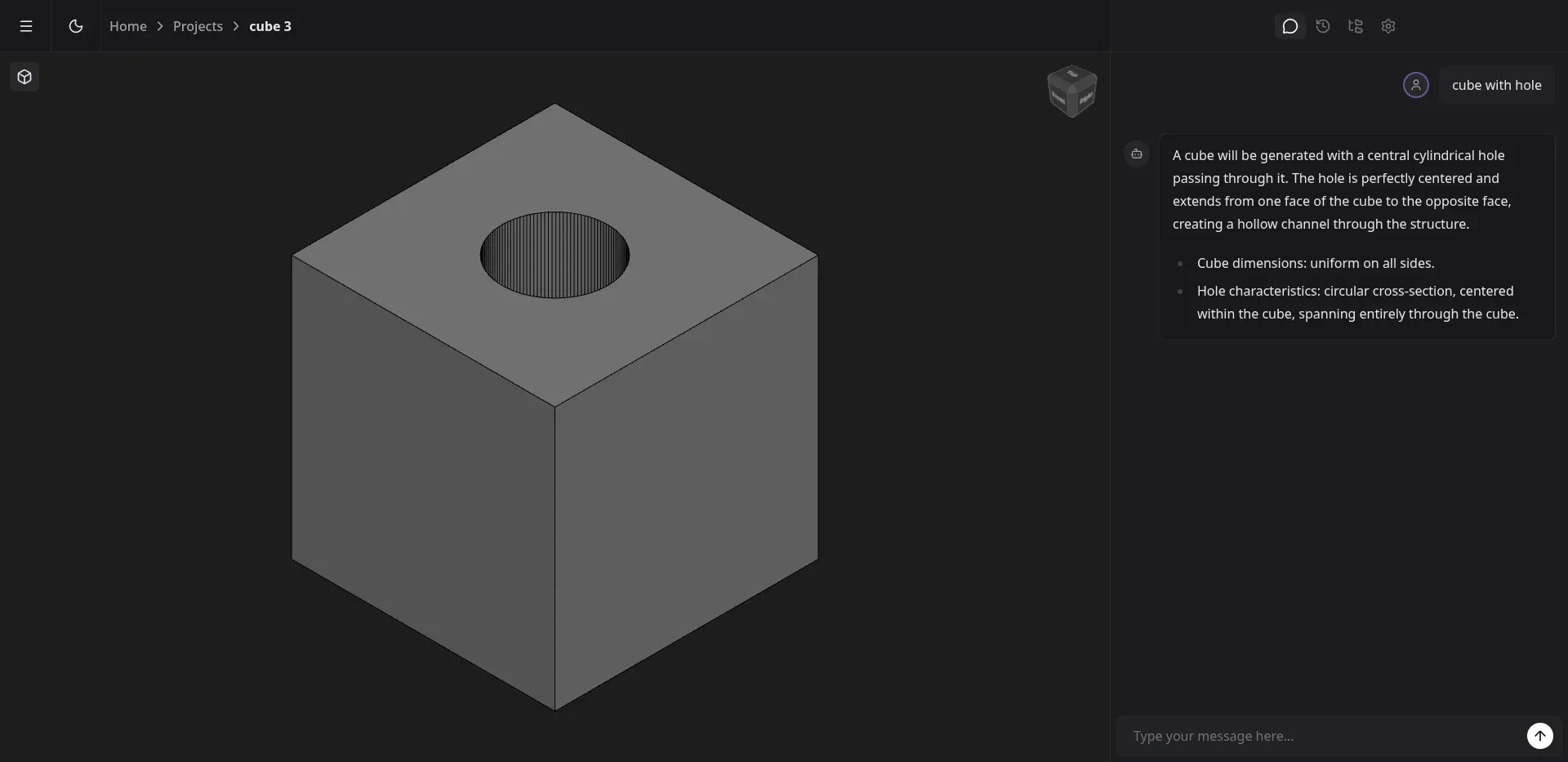
A cube with a hole. Looks fine. I was trying to get “a cube with two intersecting holes”. After several turns the agent insists there are two. The model still has one. The second pocket was hitting the wrong plane or wasn’t being registered as part of the body.
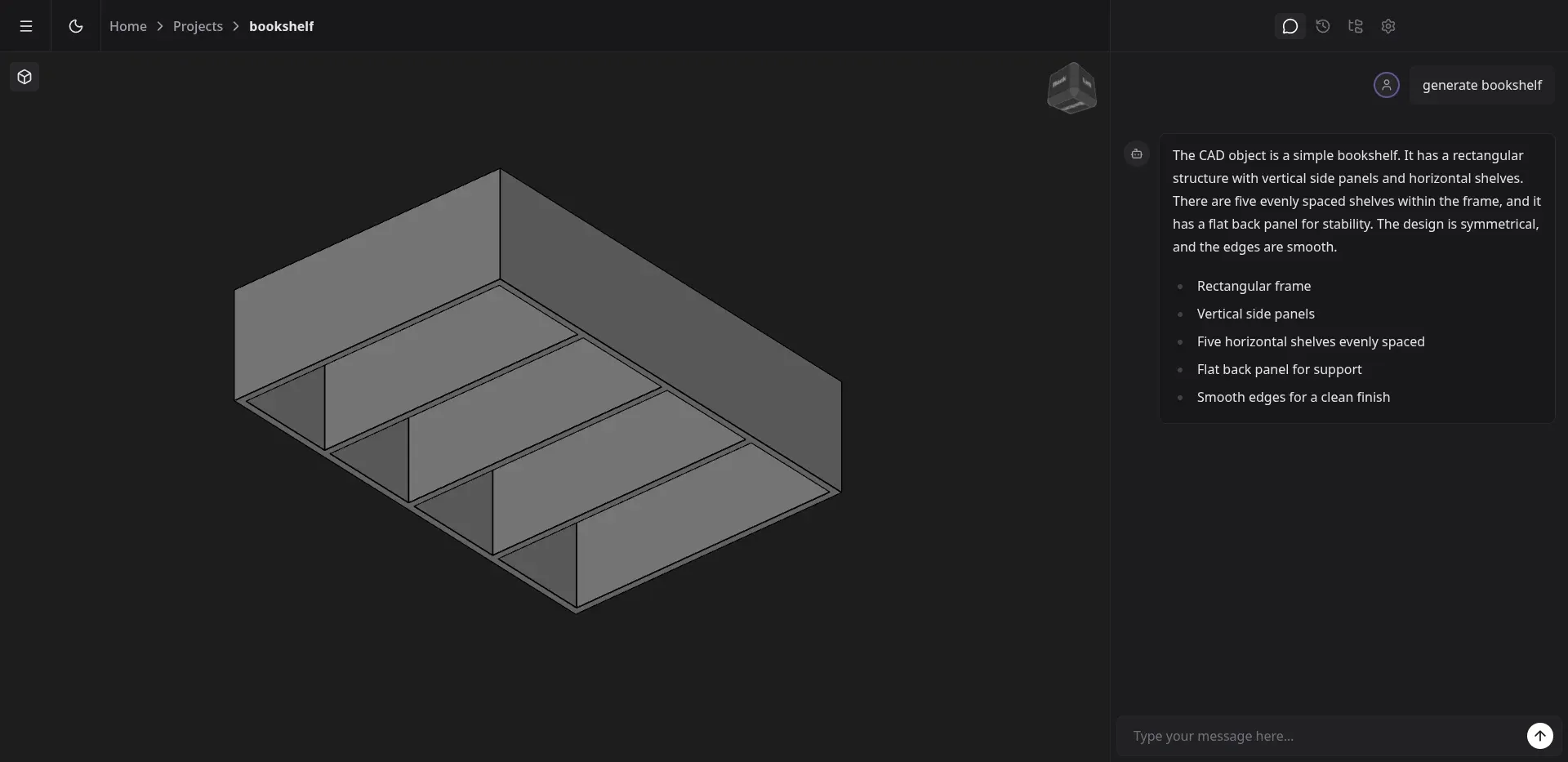
A bookshelf. Prompt: “simple bookshelf”. The feature list matches what the agent wrote itself (“rectangular frame, vertical side panels, five evenly spaced shelves”): the frame is there, walls are there, five partitions too. Except the shape lies on its side, it’s wider than tall, and the “shelves” stand vertically instead of horizontally. It came out as a cutlery tray, not a bookshelf. Formally matches the spec, useful for absolutely nothing.
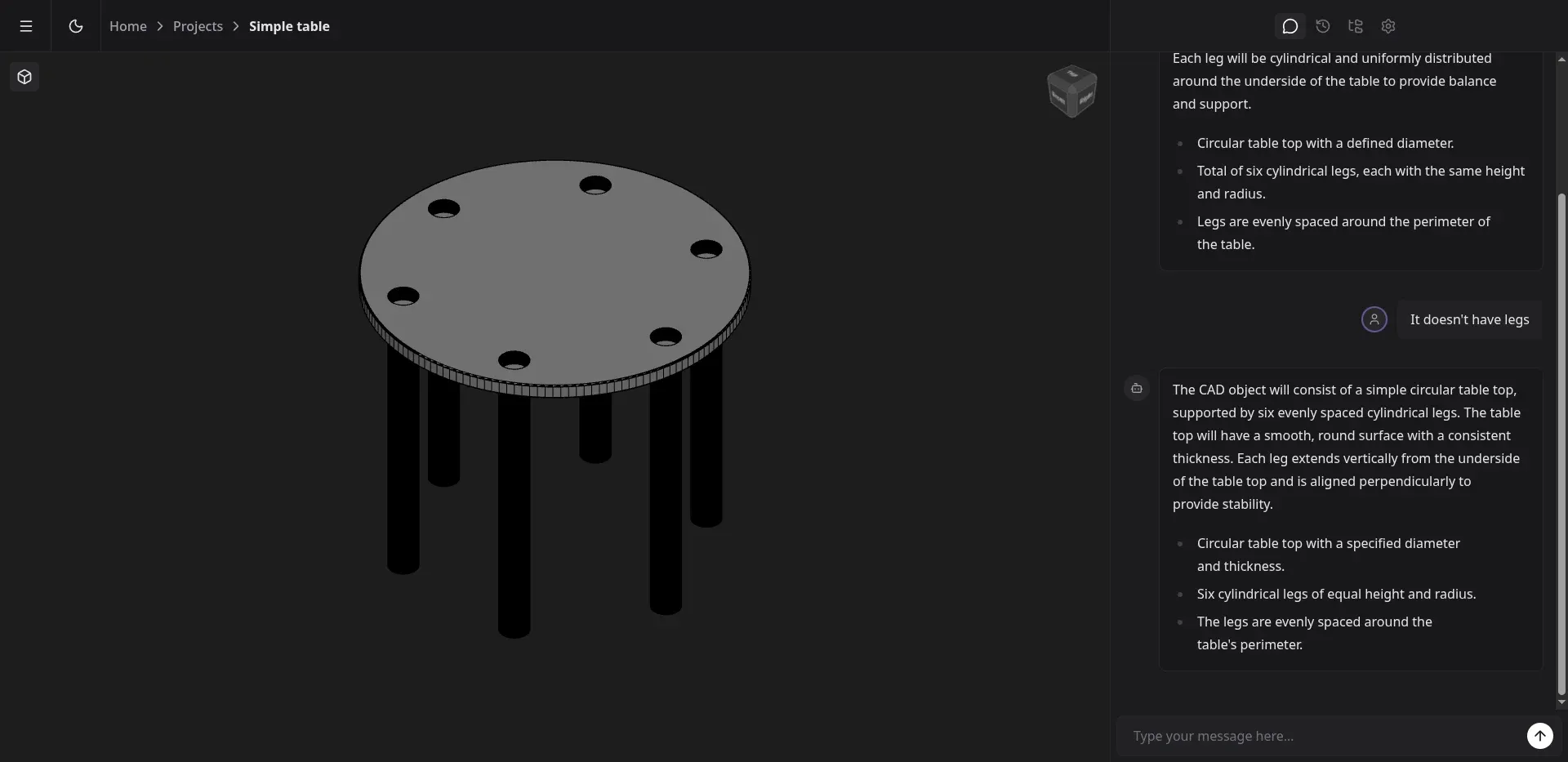
A table. Prompt: “generate simple circle table with 6 legs”. First attempt: a tabletop with six holes through it, zero legs. After a follow-up “It doesn’t have legs” the agent added legs but the holes in the top stayed. Anything a normal user would call a table is still an abstraction here.
Trade-offs and what doesn’t work
Full disclosure of what went badly:
No feedback loop. The agent emits DSL, the validator checks syntax, FreeCAD executes. Nothing verifies “render it, look at it, fix it”. Without that loop the model has no idea whether the bookshelf stands vertically, whether the “shelves” are oriented horizontally, or whether the proportions match anything you’d actually put a book on.
No geometric memory. The agent doesn’t know where the previous pad ended, so the next sketches either land on random planes or fall back to simplifications (mostly XY at Z=0). Every model comes out “flat” in a compositional sense.
Topological Naming Problem. Geometry-based edge selection saves simple fillets, but only for simple bodies. With complex geometry (loft, pipe, mirror) there’s no clean way to refer to an edge produced by two earlier operations.
Headless FreeCAD likes to crash. Certain boolean + fillet combinations take down the whole FreeCAD process, not just return an error. The worker needs a health check and a restart.
Token cost. Longer prompts with the full DSL description and workflow constraints come out to 3-4k input tokens plus the response. With “fix this” iterations it gets expensive.
Why I’m keeping the source closed
I’m not publishing the code right now. Two reasons.
First, I don’t know where this project is going. I have several directions on the table: an agent with a closed render-and-critic loop (a multimodal model looks at the GLB and corrects itself), a generator for a narrow domain (3D printer mounts, where the design space is finite), or simply a better DSL with stronger primitives. Each path needs a different architecture. Opening source for code that could flip 180 degrees doesn’t make sense.
Second, in its current state the code is more of a proof that the problem is harder than it looked than a working tool. I’d rather not encourage anyone to fork something that can’t draw a table with six legs.
What I’d do differently
I’d seriously consider CadQuery or build123d instead of FreeCAD. Both sit on OpenCascade and produce honest BREPs you can export to STEP, just without FreeCAD’s object layer. The trade-off is real though: I lose the FCStd file with a PartDesign tree you can edit in the GUI. STEP opens in FreeCAD, but as a single solid, not a list of features you can tweak. The question is whether that editability is actually valuable to the user or just looks nice on a slide.
I’d start with a critic loop on day one. Render the result to PNG, multimodal model compares against the prompt, next iteration. Without that the agent is shooting blind.
And I’d go narrow, not general. A generator for “any 3D model” isn’t a single winter’s work. A generator for GoPro mounts or 3D printer brackets is two weeks and actually works (after six years of modding my Sidewinder X1 I know exactly how many of those brackets people need and how parametric they get).
When this makes sense
The idea of an LLM as a CAD interface makes sense, just probably not in the shape I started with. Right now it looks reasonable for:
- very closed domains (parametric components, mounts, fixtures),
- generating CadQuery code directly instead of a layer above it,
- tooling like “sketch autocomplete” beside an engineer, not replacing them.
I’m coming back to this project, probably with a different backend and a much narrower scope. When there’s a final name, I’ll write about it.
FAQ
Which AI model did you use?
Claude (from Anthropic), called from the backend via the SDK. I tested Sonnet and Opus, and for DSL generation Sonnet was enough and noticeably cheaper. I also ran the whole workflow locally from a CLI agent, recently I wrote about T3 Code, a GUI over agents like that.
Why not OpenSCAD instead of FreeCAD?
OpenSCAD produces meshes, not BREPs. STEP export is weak and the model has no feature tree you can keep editing in another CAD. The whole point of the project was that at the end an engineer could open the file in stock FreeCAD and tweak it, so OpenSCAD ruled itself out immediately.
Why didn’t you just have the agent generate FreeCAD Python directly?
I tried. FreeCAD’s Python is ugly, unintuitive, has a huge surface area for bugs, and the agent constantly hallucinates non-existent methods (addCircle instead of addGeometry(Part.Circle(...))). The DSL layer narrows the decision space to things that actually work and cuts off the source of hallucinations.
How much did it cost to generate one model?
For a simple cube it’s a fraction of a cent in input. For a bookshelf with a few revision rounds, where context climbs to 6-8k tokens, it’s around $0.10-0.20 per model on Sonnet. On Opus, several times that.
Why didn’t you start with CadQuery in the first place?
Because then I wouldn’t have tried the FreeCAD path and wouldn’t know how much TNP actually costs in practice. Now I know and can choose deliberately. The other thing: I wanted to hand the user an FCStd file with a PartDesign tree, and CadQuery doesn’t produce that.
When are you coming back to the project?
No fixed deadline. I’ll come back when I have an idea for a narrow enough domain (most likely 3D printer mounts) where a render-and-critic loop can be sensibly closed within a bounded set of shapes.